

Fast Bitcoin for Mac
Bitcoin price in your Mac menu bar
The live BTC price sits next to the clock. One click opens the chart and your alerts.
What the menu bar shows
- The live price. Show the average of five exchanges, or the price on one exchange that you select.
- The change. Show the change as a percent, in dollars, or both.
- The Entry Signal dot. A small colored dot shows the current Entry Signal reading. Turn it off if you want only the price.
- Your format. Select one of three text sizes. Show or hide the cents.
- Privacy on a shared screen. Blur the price in the menu bar when other people can see your display.
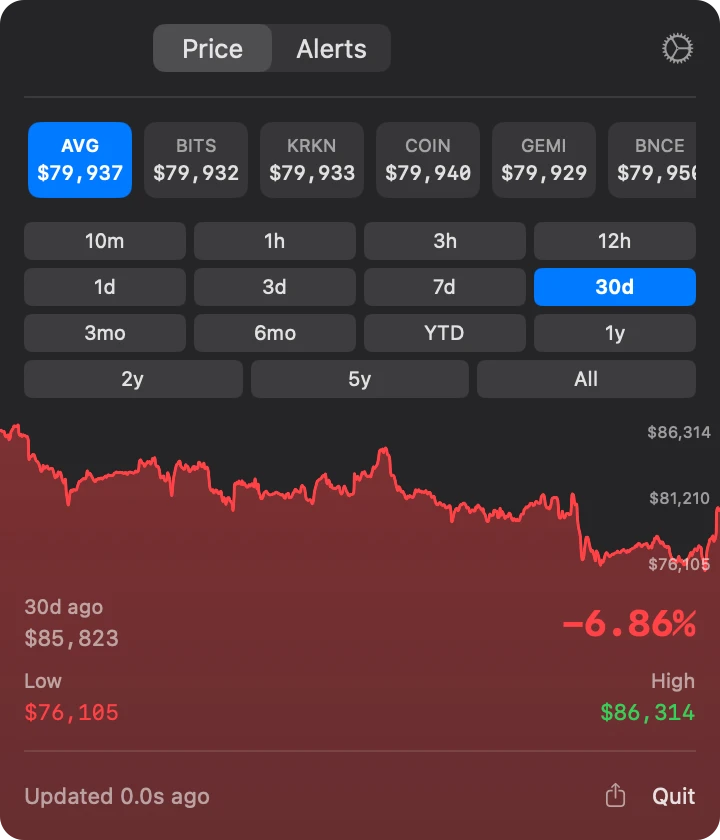
One click for the full view
- Price. Coinbase, Kraken, Bitstamp, Gemini, Binance, and the average. Charts from 10 minutes to all time.
- Alerts. Add, edit, and turn off your alerts, including Signal alerts.
- Pop out. Open the popover as a window and keep it above other windows.
- Launch at login. The price is in the menu bar each time you start your Mac.
The Entry Signal dot uses the Market Signal. Read how the Signal works.
Price alerts on your Mac
Set an alert in the popover. Our server checks the price every 5 seconds and sends a Mac notification when your condition occurs. The popover does not need to be open.
Price targets
Get an alert when Bitcoin goes above or below a price.
Percent moves
Get an alert when the price moves by a percent in a time window, from 10 minutes to 24 hours.
Signal changes
Get an alert when the Market Signal crosses a level or changes zone.
Bitcoin price app for Mac questions
Does Fast Bitcoin for Mac need a window?
No. The app lives in the menu bar. Click the price to open the popover. You can also pop it out as a window.
Which exchanges does it use?
Coinbase, Kraken, Bitstamp, Gemini, and Binance US. The average is the mean of the five prices.
How often does the price update?
The price updates every few seconds over a live connection.
Which macOS version do I need?
macOS 14 Sonoma or later.
Does one subscription cover my Mac and my iPhone?
Yes. One subscription works on iPhone, iPad, Mac, Apple TV, and Apple Watch with the same Apple Account. The subscription starts with a 3-day free trial.
More Bitcoin price tools
Price alerts
24 alert types by push or email. Our server checks them every 5 seconds.
Open Price alertsiPhone and iPad
The live price, the Market Signal, and 24 alert types in three tabs.
Open iPhone and iPadWidgets and Apple Watch
The price and the Signal on the Home Screen, the Lock Screen, and the watch face.
Open Widgets and Apple Watch